Office Chairs Lumbar Support: Your Health Guide

You sit down to answer emails, pay bills, or start a full workday from home. By late morning, your lower back feels tight. By afternoon, you're shifting around, leaning forward, and wondering if your desk setup is the problem.
For a lot of people across Grants Pass, Medford, Ashland, and the wider Rogue Valley, that ache starts with the chair. Not the computer. Not your motivation. The chair.
That Aching Back? Your Office Chair Might Be the Culprit
A dining chair can work for a short task. A cushy accent chair might feel pleasant for half an hour. But when you sit for long stretches, your lower back needs a chair that supports the natural curve of your spine.

That's where office chairs lumbar support matters. Lumbar support is the part of the chair designed to meet the inward curve of your lower back. When it fits you well, it helps you sit with less strain. When it misses the mark, your body does the work instead.
Clinical evidence shows that using an office chair with proper built-in lumbar support can reduce back pain symptoms, with one study finding a drop of up to 48% in four weeks among office workers, as noted in this lumbar support overview. That's a practical reminder that the right chair isn't a luxury item for people with perfect home offices. It's basic support for daily life.
Why home workers feel it first
A lot of people didn't build their home office around ergonomics. They made do with what was already in the house. That was understandable. It's also why so many people now notice sore hips, stiff shoulders, and that familiar low-back fatigue.
If you want another plain-English look at what good back support should do in a desk chair, GIBBSONN Interiors explains it well. The key idea is simple. A chair shouldn't force your body to fight for posture all day.
Practical rule: If you feel worse after sitting than you did before sitting, your chair is asking too much from your back.
Support changes more than your desk chair
Lower-back comfort isn't only a work issue. If you also deal with soreness while relaxing at home, it can help to compare desk seating with recliners designed for back pain relief, because many of the same support principles carry over.
The bigger point is this. Your back usually isn't asking for a fancy chair. It's asking for the right shape, in the right place, for your body.
Understanding Lumbar Support and Why It Matters
Sit in a chair that fits you well, and your lower back often settles into place without much effort. Sit in one that misses the mark, and you start shifting, scooting forward, or propping yourself up before the morning is over.
Your lower back has a natural inward curve. That curve is part of how your body carries weight while sitting, standing, and moving through the day. When a chair leaves that area hanging in open space, the pelvis tends to roll back, the lower spine flattens, and the muscles around it start doing extra work just to hold you up.
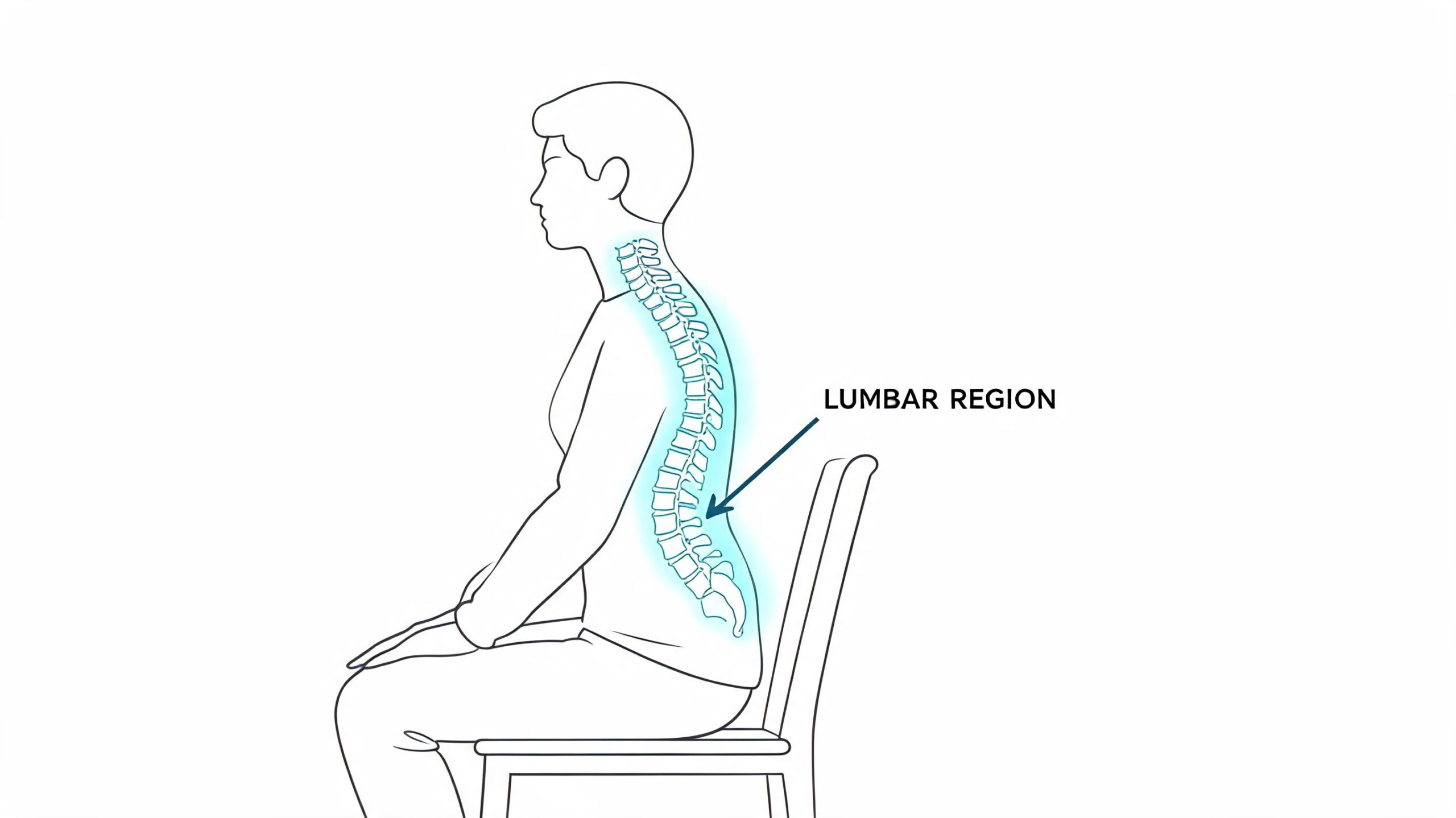
A simple way to understand lumbar support is to pay attention to the gap between your back and the chair. Good lumbar support fills that gap gently, right where your body needs contact. It does not force you into a military-straight posture. It gives your back a place to rest.
That distinction matters in the showroom. Two chairs can look nearly identical online and still feel completely different once you sit down. One may meet the hollow of your lower back in a comfortable, natural spot. The other may hit too high, too low, or press so firmly that it pushes you forward on the seat.
What good lumbar support actually does
When lumbar support is doing its job, you usually notice the result before you notice the mechanism.
- It helps your spine keep its natural shape instead of flattening out as you work.
- It reduces the need to brace with your back muscles for long stretches.
- It spreads your body weight more evenly across the chair back and seat.
- It makes upright sitting feel easier so posture feels supported, not forced.
In plain terms, the chair should meet your body, not ask your body to adapt to the chair. A lumbar pad should feel like a gentle hand at the small of your back. If it feels like a knuckle digging in, the fit is off.
Why placement matters more than the label
Many shoppers see the words “lumbar support” on a tag and assume the problem is solved. In practice, placement is what decides whether that feature helps or annoys you.
If the support lands too low, it misses the curve it is supposed to support. If it lands too high, it can crowd the spine and make the upper pelvis feel pushed forward. If it sticks out too far, the chair may feel tiring even if the rest of the seat is well made.
That is one reason trying chairs in person is so useful. In a local showroom, you can sit back fully, feel where the support touches you, and compare that contact point across several models in a few minutes. For many people, that hands-on test teaches more than a page of product specs.
If you are planning the full room, not just the chair, these home office furniture ideas can help you match seating support with desk height, layout, and the way you work at home.
The Different Types of Office Chair Lumbar Support
Not all office chairs lumbar support systems work the same way. Some are built into the chair and never move. Others let you raise, lower, soften, or increase the support. A few are designed to move with your body as you shift position.
That's why asking “What's the best chair?” usually leads to the wrong answer. The better question is, “Which kind of support matches how I sit, and what my back tolerates well?”
Comparing Lumbar Support Types
| Support Type | Adjustability | Best For | Consideration |
|---|---|---|---|
| Fixed lumbar | Little to none | Light use, guest rooms, short sessions | Can miss the right spot for many bodies |
| Height-adjustable lumbar | Moves up and down | Shared workspaces, varied heights, most home offices | Better fit, but still may feel too firm for some |
| Height and depth adjustable lumbar | Moves vertically and changes pressure | People with ongoing discomfort or specific fit needs | Takes a few minutes to dial in properly |
| Dynamic or self-adjusting lumbar | Adapts as you move | People who change posture often during the day | Feel varies widely by design |
Fixed support works for some, not for many
A fixed lumbar shape is the simplest version. It's built into the chair back and stays where the manufacturer placed it.
That can be acceptable if the chair happens to line up with your body. But that's a big “if.” Research has shown that fixed-height lumbar supports are unlikely to suit the wide range of office users, based on findings summarized in this PubMed study on lumbar support preferences.
Adjustable support is usually the safer bet
Manual adjustment gives you more control. Some chairs let you move the lumbar feature up and down. Better models let you also bring it forward or back, which changes how much pressure you feel.
Generic lumbar support often fails to account for body type or medical needs, and overly aggressive fixed supports can worsen conditions like disc herniations, as explained in this chair review guide focused on back pain. Softer or ratcheting support often works better for people who need relief without feeling pushed into an unnatural posture.
If your first reaction is “this chair is jabbing me,” don't assume you need to get used to it. You may simply need a different lumbar shape.
Dynamic support can feel more natural
Dynamic lumbar systems are built to respond as you lean, type, recline, or shift sideways. Some mesh-backed chairs do this through flexible tension. Others use internal components that change pressure subtly as you move.
For some people, that feels less intrusive than a firm pad. For others, especially those who prefer a stable backrest, a manual system feels more dependable.
A useful real-world comparison is power seating that already combines back comfort with adjustability, like this power reclining chair with power headrest and lumbar support. It reminds shoppers that support isn't just about whether lumbar exists. It's about whether you can tune it to your own body.
Inflatable and smart systems are emerging
Some higher-end chairs use air chambers or app-connected systems to adjust support over the day. Those can be interesting, especially for people who like fine control.
Still, most shoppers are better served by getting the basics right first. A well-built chair with mechanical adjustment often solves more problems than a complicated feature list.
Finding Your Perfect Fit How to Measure and Assess
You sit in one chair and feel a little “held.” You sit in another and your lower back feels poked, or your hips slide forward after five minutes. That difference is what fit feels like in real life, and it is why the right lumbar support is personal.
In our showroom, this is the part that surprises people. They often come in asking for the best chair, but what they really need is the chair that matches their spine, seat depth, and the way they work through the day. A good fit works like a good pair of shoes. Two well-made options can both be quality products, but only one feels right on your body.
Start with your own shape
Before you shop, do a quick check at home in a firm chair:
- Sit all the way back so your pelvis touches the backrest.
- Find the natural hollow in your lower back with your hand.
- Notice where that curve sits compared with your waistline.
- Pay attention to pressure. Support should feel present, not forceful.
- Check your thigh position. If the seat is too deep, you will slide forward and lose the back support.
That small hollow is the spot the chair should meet. If the support lands too low, it can feel like a lump near your belt. Too high, and it starts pushing into an area that does not need the same kind of fill.
Body shape changes this experience. A taller torso, broader hips, or a fuller midsection can all change where support feels natural. That is why a fixed curve that suits one person can feel wrong to another, even if both people are sitting with good posture.
Use simple fit checks in the showroom
A showroom gives you something online photos cannot. You can feel the shape of the backrest against your body and notice what happens after a few minutes, not just the first few seconds.
As you test a chair, ask yourself:
- Does the lumbar support meet the small of my back?
- Can I sit back fully without scooting forward?
- Do my shoulders stay relaxed while my lower back feels supported?
- Does the chair support me without tipping my pelvis forward too much?
- Can I picture sitting through a full work session without adjusting every few minutes?
One useful tip from years on the sales floor is to test the chair in your real working posture, not your best behavior posture. If you type slightly forward, read documents off to one side, or recline during calls, do that in the chair. A model that feels fine in a perfect upright pose can feel very different once you use it the way you work.
If you're planning your room from scratch, Blu Monaco's workspace design insights offer a helpful companion read on how furniture layout affects daily comfort and function.
Your best fit should feel quiet. Your back feels supported, your shoulders soften, and you stop noticing the chair.
Measure the room too
Body fit is only half the job. Room fit matters just as much in a home office or a tighter work area.
We have seen shoppers find a chair that feels excellent, then realize the arms hit the desk, the back is too tall for a storage cabinet, or the base is too wide for the space they need to move through each day. Before you buy, review a simple guide to measuring furniture for your space so the chair fits your office as well as it fits your back.
A Buyer's Checklist for Testing Chairs In-Store
You sit down in a chair at the store and the first 30 seconds feel fine. Ten minutes later, your lower back starts arguing with you. That is why showroom testing matters. Lumbar support is personal, and the right fit depends on where your back curves, how you sit, and how your body settles once the novelty wears off.
In our showroom, the best chair is rarely the one with the longest feature list. It is the one that meets your body in the right place. A good lumbar system should move enough to match your natural curve, and it should be easy to adjust while you are sitting, not after a round of guessing and standing up.
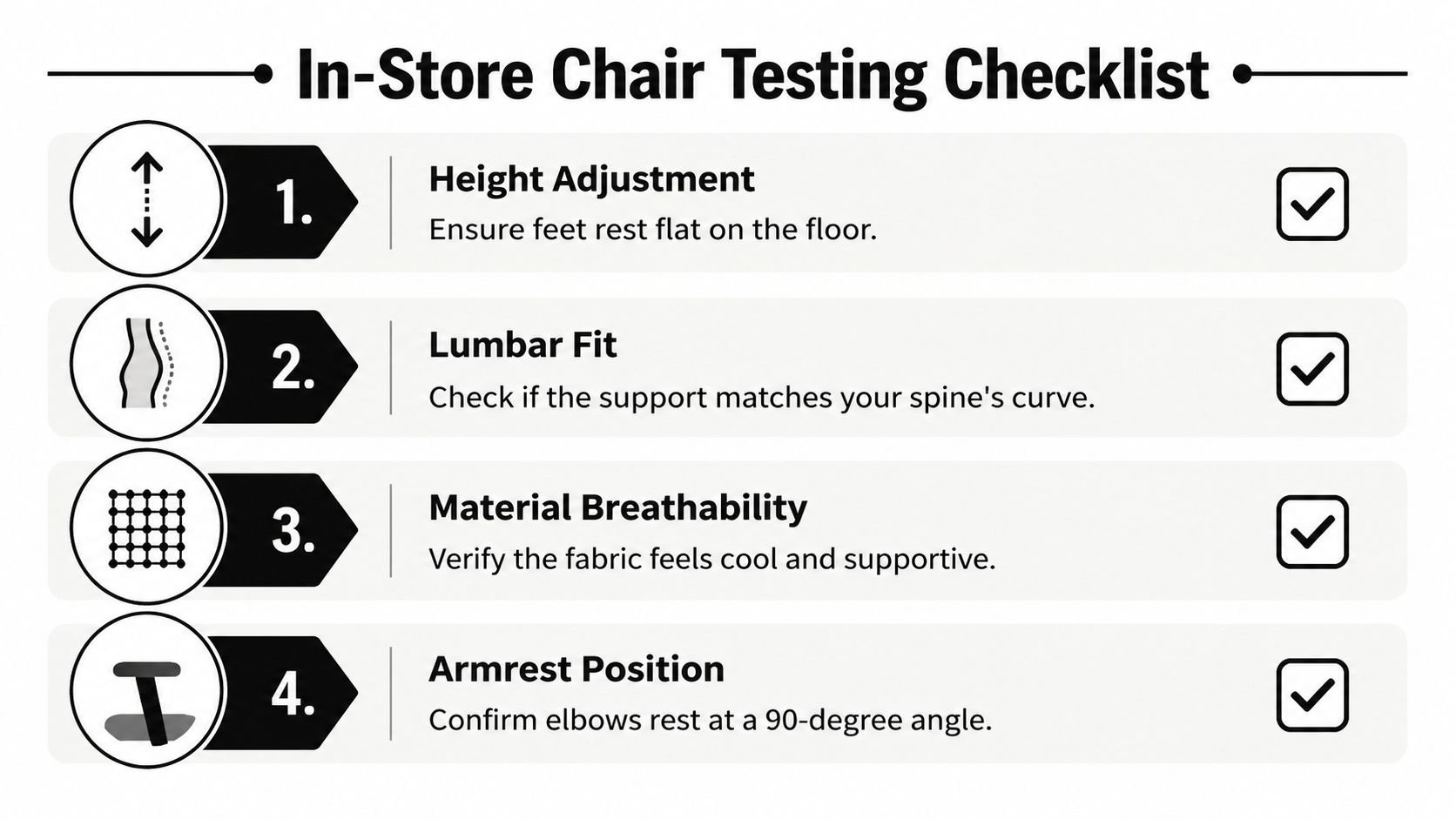
Bring this checklist with you
Use the chair the way you will use it at home or at work. A showroom test works best when it feels a little ordinary.
- Stay in the chair for several minutes: Early comfort can be misleading. Give your body enough time to reveal pressure points or a support that feels too aggressive.
- Adjust the lumbar while seated: If the control is awkward in the store, it will be awkward on a busy Tuesday afternoon too.
- Notice whether the support fills your back or pokes it: Good lumbar support feels like a gentle hand at your beltline. Poor support feels like one hard spot pressing in.
- Try more than one posture: Type, lean in to read, then recline as if you are on a call. The chair should support you through those shifts.
- Check seat depth before anything else: If you cannot sit fully back, the lumbar support cannot meet your spine where it should.
- Pay attention to your shoulders and jaw: Back fit often shows up higher in the body. If your neck tightens, something lower down may be off.
- Bring your desk or keyboard height measurement: A comfortable chair still has to line up with the surface where you work every day.
If you are furnishing for a larger team, the same testing logic applies at scale. Companies comparing workspace solutions for BPO providers often focus on output and floor planning, but chair fit still comes down to one person sitting in one seat for hours at a time.
What to say when a chair feels “off”
A lot of people know a chair feels wrong but cannot explain why. Plain language helps the salesperson help you.
- “The support feels too high.”
- “I feel pushed forward instead of settled back.”
- “I lose support when I lean back.”
- “The seat is too deep for me to reach the backrest comfortably.”
- “It feels good at first, then I start fidgeting.”
Those comments point to a fix. “Good” and “bad” usually do not.
Judge the chair by what happens after your body relaxes into it. The right one feels quieter, steadier, and easier to forget.
Why showroom testing still wins
Testing chairs in-store lets you compare one back shape against another, one seat depth against another, and one style of lumbar support against another in the same afternoon. That side-by-side experience teaches you more than any product page can. You start to feel the difference between a chair that looks ergonomic and one that actually fits.
That hands-on approach has been part of the Gates Home Furnishings history of service and value for generations. The goal is not to chase a generic “best” chair. The goal is to find the chair that fits your back, your desk, and your workday.
The Gates Difference Service and Value Since 1946
You can learn what lumbar support should do. The test happens when you sit down and feel whether the chair meets your back where it curves.
That is the part a local showroom can teach better than a product page. After reading about seat depth, back shape, and lumbar height, you need a place to compare those details with your own body in real time. One chair may feel supportive for five seconds and tiring after five minutes. Another may let your shoulders relax and your lower back settle into place without any extra effort.
Gates Home Furnishings has built that kind of hands-on shopping around its long history of service and value since 1946. The point is not to steer every shopper toward the same chair. The point is to help you notice what your spine, hips, and legs are telling you while you test different fits.
A large showroom helps with that because you can move from one model to the next while the feeling is still fresh. You can sit in a firmer back, then a softer one. You can compare a chair with pronounced lumbar pressure to one with gentler support. That side-by-side experience makes ergonomic theory easier to understand, the way trying on shoes tells you more than reading the size chart.
It also helps to see how the chair will live in the rest of your space. If you are setting up a home office, comfort is only one part of the decision. You may also want the chair to work with nearby desks, storage, or accent pieces so the room feels useful and lived in, not pieced together.
Good service matters after you choose, too. Delivery and assembly save you from wrestling with parts, guessing at setup, or using a chair that is adjusted poorly from the start. Payment options can matter for the same reason. A better-fitting chair often costs more than an entry model, and spreading that cost out can make it easier to choose the chair your back will still appreciate months from now.
The same principle shows up in larger workplace planning. Companies comparing workspace solutions for BPO providers often look at layout, setup, and support services together. At home or at work, the lesson is the same. A good chair purchase is not only about features on a tag. It is about fit, setup, and daily use working together.
That is the Gates difference in plain terms. You get a place to test what you learned, compare chairs with your own body as the guide, and leave with a chair that fits your workday instead of a generic idea of the “best” office chair.