Best Office Chairs for Back Pain: A Local’s Guide


The workday often starts the same way. Coffee goes down, the laptop opens, and within an hour the lower back starts sending little warnings. By lunch, the chair feels too hard, too deep, too upright, or somehow all three at once.
That frustration is common in home offices across Grants Pass, Medford, Ashland, and the rest of Southern Oregon. Many people search for the best office chairs for back pain and end up staring at long online lists of models they cannot try before buying. That usually creates more confusion, not less.
A better approach starts with the body, not the brand name. The right chair depends on how a person sits, how tall they are, where their pain shows up, and what kind of work fills the day. For readers also working from a couch, kitchen table, or shared space, a portable support tool like this DigiDevice ergonomic solution can also help reduce awkward laptop posture between full desk setups.
Since 1946, George Gates' promise of Service and Value has shaped how furniture help is given in the Rogue Valley. That same spirit still matters when someone is trying to solve back pain at a desk. Good guidance should make chair shopping feel less mysterious and more practical.
Table of Contents
- Your Guide to a More Comfortable Workday
- Why Your Back Hurts and How Your Chair Can Help
- The Anatomy of an Ergonomic Office Chair
- Matching a Chair to Your Specific Needs
- The Art of the In-Person Test Drive
- Our Commitment to Service and Value
- Find Your Pain-Free Chair in Southern Oregon
Your Guide to a More Comfortable Workday
Back pain at a desk usually builds slowly. A person leans forward to read the screen, perches on the edge of the seat during a call, then settles into a slouch by late afternoon. The chair may look fine, but the body keeps working around it.
That's why the best office chairs for back pain aren't just “nice office chairs.” They're chairs that adjust to the person using them. A chair should support work, not ask the back to do extra labor all day.
For many Southern Oregon households, the goal isn't finding the fanciest model. The goal is finding something that feels right at 9 a.m., still feels supportive after lunch, and doesn't leave the body stiff by evening.
Main idea: The best chair for back pain is usually the one that fits the person's body, desk setup, and daily habits, not the one with the loudest marketing.
A helpful search starts with a few plain questions:
- Where does the discomfort show up? Lower back, hips, upper back, or legs can point to different fit issues.
- How long is the sitting stretch? Someone who sits through long blocks may need different adjustments than someone who gets up often.
- What equipment is used daily? Keyboard work, video calls, paperwork, and laptop-only setups all change posture.
- What feels wrong in the current chair? Sliding forward, pressure behind the knees, shrugged shoulders, or no back contact are all useful clues.
This kind of shopping is easier in person. A real chair has to be sat in, adjusted, and judged by feel. That's one reason a physical showroom matters so much for people trying to solve a comfort problem instead of just buying another office item.
In Grants Pass, that hands-on process has mattered for generations. Since 1946, George Gates built the business around Service and Value, and that approach still fits office seating better than any quick online ranking ever could.
Why Your Back Hurts and How Your Chair Can Help
A Simple Way to Understand Sitting Strain
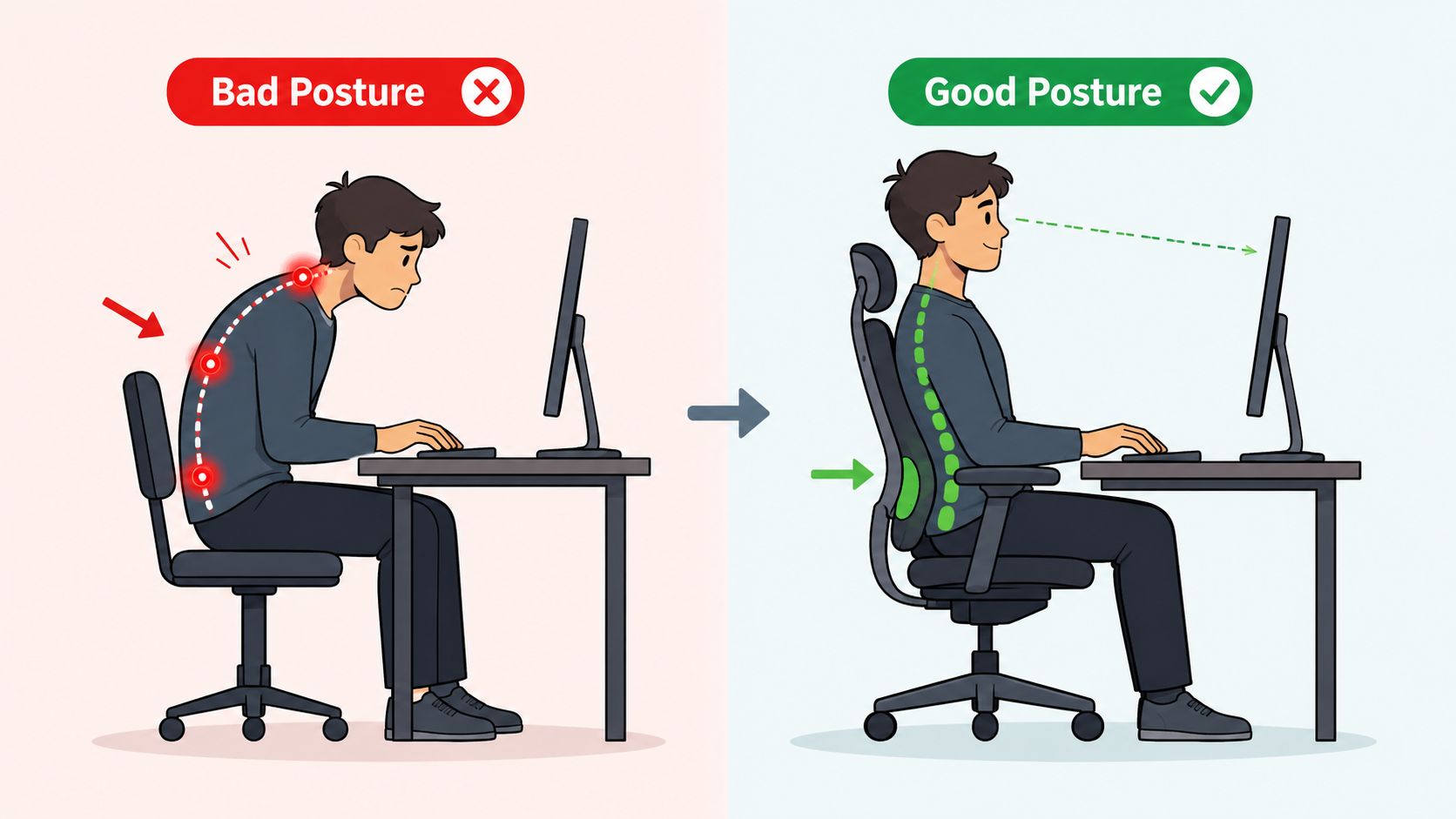
The spine works a bit like a stack of blocks with gentle curves built in. When those curves stay supported, the body carries weight more evenly. When a person slumps, reaches, or twists for hours, the stack shifts and the muscles around it start compensating.
That's why a poor chair can leave someone sore even if the seat feels soft at first. Softness alone doesn't guide posture. If the chair lets the pelvis roll backward, pushes the user too far forward, or leaves a gap at the lower back, the body spends the day holding itself up.
A lot of people assume pain means they need more padding. Often, they need better positioning.
Sitting discomfort usually isn't one dramatic moment. It's repeated small strains from a posture the body can't maintain comfortably.
Movement matters too. Even a good chair isn't meant to lock someone into one pose for the whole day. Gentle resets, short standing breaks, and simple mobility work can support the same goal as a better seat. Readers who want a practical routine alongside chair changes may find The Lagom Clinic's guide to back exercises useful for adding light movement into the day.
What a Supportive Chair Actually Does
A supportive office chair helps the body keep its natural spinal shape instead of collapsing into a C-shape. It gives contact where the lower back curves inward, places the feet and knees in a more balanced position, and supports the arms so the shoulders don't creep upward.
Three common problems show up again and again:
- No lower-back contact: The user slides forward and loses support.
- Wrong seat depth: The chair presses behind the knees or forces a perch on the front edge.
- Poor arm position: The shoulders lift, the neck tightens, and the upper back joins the problem.
Shoppers looking at rolling task seating can compare common build styles in these office chairs on wheels to see how base design and adjustability affect daily use.
The important shift is simple. A chair doesn't “fix” a back. It reduces strain so the body can work in a more neutral position. That's why the features matter so much.
The Anatomy of an Ergonomic Office Chair

An ergonomic chair isn't defined by a modern shape or a tall back. It's defined by adjustability. One of the clearest summaries of this comes from Spine MD's office chair guidance, which notes a major shift from generic seating to highly adjustable task chairs and emphasizes adjustable lumbar support, seat depth that leaves about 2 to 3 fingers behind the knees, and armrests that allow elbows near 90 degrees because the chair should match the user's body and help maintain the spine's natural curve.
Start with Lumbar Support
The word lumbar refers to the lower back.
This part of the chair should meet the small of the back, around belt level, and support the inward curve there. If it sits too high, it can feel like a hard bump. If it sits too low, it won't do much at all.
What to look for:
- Height adjustment: The support should move up or down to hit the right spot.
- Useful shape: A gentle contour usually works better than a flat back.
- Tunable feel: Some users do better with firmer contact, while others need lighter pressure.
For shoppers who want to compare seat options built around that feature, these office chairs with lumbar support show the range of lumbar-focused designs.
Check the Seat Before the Cushion
People often judge a chair by the first soft feeling of the seat. That can be misleading. Seat size and shape matter just as much as padding.
A seat that's too deep can press into the back of the legs. A seat that's too shallow may leave the thighs unsupported. A simple test helps. Sit fully back and check for about 2 to 3 fingers of space behind the knees, based on the guidance cited above.
A few signs of better seat design include:
- Waterfall front edge: This can reduce pressure at the seat edge.
- Adjustable height: Feet should rest comfortably instead of dangling.
- Balanced firmness: Too hard can feel punishing, but too soft can let posture collapse.
Practical rule: If the chair only feels comfortable when sitting on the edge of it, it probably isn't fitted well.
Recline Is a Back Feature, Not a Nap Feature
Many buyers ignore recline because they think it's only for relaxing. For back comfort, recline is a working feature. Guidance on back-pain-focused seating highlights backrests that can recline roughly 100 to 110 degrees or more with controlled resistance, along with dynamic lumbar support and waterfall seat edges, because those features help distribute load and allow small movements that reduce static strain during desk work. That summary appears in UPLIFT Desk's ergonomic overview.
The key idea is movement. A rigid upright position may look “correct,” but it can become tiring fast. A slight recline lets the back share load differently through the day.
Good recline should feel controlled, not floppy. The user should be able to lean back without feeling like they're falling away from the desk.
Armrests and Materials Matter More Than People Expect
Armrests don't just support the arms. They help the upper body settle. When they're too high, the shoulders shrug. When they're too low, the torso slumps. The sweet spot usually allows the elbows to rest near a right angle without lifting the shoulders.
Materials matter too, though not in a flashy way. Breathable backs can feel cooler. Cushioned seats can feel friendlier in long sessions. Upholstery choice changes comfort, but it doesn't replace fit.
A strong checklist for the best office chairs for back pain looks like this:
| Feature | Why it matters | Quick check |
|---|---|---|
| Adjustable lumbar | Supports the lower back curve | Hits the small of the back |
| Seat depth | Prevents knee pressure and perching | Leaves 2 to 3 fingers behind knees |
| Seat height | Helps foot and hip position | Feet feel grounded |
| Recline and tilt | Reduces static loading | Allows easy posture changes |
| Armrests | Eases shoulder and neck strain | Elbows rest comfortably near 90 degrees |
Matching a Chair to Your Specific Needs
The phrase “back pain” sounds simple, but it isn't. Two people can both say their back hurts and need very different chairs. One may need a firmer, more upright feel. Another may do better with more adjustable lumbar depth and a slight recline.
One Body, One Workday, One Fit
A smaller-framed person can disappear in a wide, deep chair. A taller user may feel unsupported by a short back or cramped by limited seat depth. Someone who types all day may prioritize arm positioning, while someone who spends the day on calls may shift posture constantly and need easier recline changes.
A few examples make this clearer:
- The all-day keyboard user: Usually needs armrests that support relaxed shoulders and a seat depth that allows full back contact.
- The frequent mover: Often benefits from a chair that reclines smoothly and doesn't punish small posture changes.
- The taller sitter: May need more back height and a seat pan that doesn't cut off thigh support.
- The petite user: Usually needs a shallower seat and lower adjustment range so the feet aren't left searching for the floor.
Generic review lists often fall short because they describe features without asking how a real person will interact with them hour after hour.
Readers who want to compare common shopper questions and fit concerns can scan these office chair reviews and buying notes before testing chairs in person.
Why Diagnosis Changes the Answer
Health specialists have stressed that different diagnoses can call for different chair characteristics. As summarized in BTOD's review guide, many people treat back pain as one problem, but conditions like sciatica or spinal stenosis may respond differently, and the wrong lumbar pressure or seat angle can aggravate symptoms. That's why personalized fitting matters.
A chair that feels supportive to one person can feel irritating to another, especially when the pain has a specific medical cause.
That doesn't mean every shopper needs a medical deep dive before buying a chair. It does mean that “ergonomic” isn't automatically enough. People recovering from surgery, dealing with radiating leg pain, or managing a diagnosed spine condition should pay attention to how the chair feels after several minutes, not just the first sit.
If a certain setting increases numbness, pressure, or sharp discomfort, that's useful information. Sometimes the right answer is a different chair. Sometimes it's a footrest, a desk change, or a conversation with a clinician before purchasing anything at all.
The Art of the In-Person Test Drive

Buying a chair for back pain without sitting in it is a little like buying shoes based on a photo. The description may sound right, but the fit can still be off in ways that become obvious within minutes.
That's where a showroom visit changes the process. In a 30,000 sq. ft. showroom in Grants Pass, shoppers can move from one chair to the next, compare shapes, feel lumbar differences, and notice what their body keeps reacting to. The point isn't to try everything. The point is to notice patterns.
How to Test a Chair Like It Will Be Used at Home
A smart test drive is simple and practical.
- Wear normal work shoes: Heel height and sole thickness change leg position.
- Sit all the way back: The lower back should meet the chair, not float away from it.
- Stay seated long enough: First impressions can be wrong. Pressure points often show up after a few minutes.
- Bring real habits into the test: If the workday involves typing, reading, and leaning in during calls, those movements should happen in the chair.
- Adjust one thing at a time: Seat height first, then lumbar, then arms, then recline.
Some shoppers also bring a laptop or mimic their actual desk posture. That's useful because back pain often comes from the combination of chair and work setup, not the chair alone.
For users who need a taller sit position for desk height or body proportions, these office chairs with high seat height can help narrow the field before a visit.
What to Notice in the First Few Minutes
The body usually gives clear signals.
If the chin pokes forward, the setup may be pulling the user out of alignment. If the shoulders climb upward, the armrests may be wrong. If the sitter keeps scooting forward, the seat depth or lumbar location may be off.
A good in-person test often follows this rhythm:
- Sit down and set the feet.
- Adjust the seat so the body settles naturally.
- Lean back slightly and see whether the lower back still feels supported.
- Rest the forearms and check whether the shoulders soften.
- Stay there long enough to notice pressure behind the knees, hips, or lower back.
The right chair often feels less dramatic than expected. It doesn't force a posture. It makes a better posture easier to maintain.
Why a Showroom Visit Changes the Decision
Local furniture guidance stands apart from online guesswork. In-store testing lets shoppers compare supportive seating across different builds and materials from known brands carried in the showroom, including La-Z-Boy, Flexsteel, Ashley, and Beautyrest across broader home categories.
It also gives room to think beyond the office chair itself. A person furnishing a workspace may also discover storage, desks, or even Unique Finds made from reclaimed wood or teak that help create a room that's practical and personal, not just functional.
Most important, no box gets dropped at the doorstep and left there to figure out later. A chair that supports the back should be chosen with the body present.
Our Commitment to Service and Value
Support Doesn't End at Checkout
A back-friendly chair isn't a one-day purchase. It's part of the daily routine, so after-sale support matters. That's where the old promise from 1946 still means something. George Gates built the business on Service and Value, and that phrase still fits office seating better than any flashy slogan.
Shoppers often have the same practical questions after they choose a chair. How is it assembled? What if adjustments feel confusing at first? What helps protect the investment over time? Those questions deserve plain answers.
The process should feel manageable:
- Delivery should be professional: White-Glove Delivery means the team handles setup rather than dropping off a box.
- Assembly should be done correctly: A supportive chair only works as intended when it's put together and positioned properly.
- Protection should be understandable: Coverage and care options should be explained in normal language, not fine-print jargon.
Some furniture problems start after delivery. Good service prevents that by making sure the chair is set up to be used, not just owned.
A Local Store Should Make Furniture Easier
A family-owned furniture store should reduce friction, not add it. That includes helping customers sort through comfort questions, explaining maintenance, and making delivery feel like a relief instead of another task on the list.
That same practical approach carries into the rest of the home as well. Some customers come in for office seating and end up solving a bedroom or living room need in the same trip. Others find one-of-a-kind accent pieces in the showroom's Unique Finds collection and bring home reclaimed wood or teak pieces that give the space more warmth and character.
The point is simple. Comfort doesn't stop at the moment of purchase, and neither should service.
Find Your Pain-Free Chair in Southern Oregon
The Best Choice Is the One That Fits in Real Life
The best office chairs for back pain aren't picked by photo, trend, or buzzwords. They're chosen by fit. The chair has to support the lower back in the right place, allow healthy movement, and feel right for the person who'll use it every day.
That's why local testing matters so much. Shoppers from Grants Pass, Medford, Central Point, Ashland, and the wider Rogue Valley can compare options in person, adjust them on the spot, and leave with a clearer sense of what their back prefers. Readers planning a full workspace refresh can also browse these home office furniture ideas to think through desk layout, storage, and room flow before visiting.
Budget matters too, and comfort shouldn't be limited to one price point. Gates Easy Pay includes $0 down, 6-month interest-free, and no-credit-needed options, which can make a supportive office setup easier to bring home without waiting.
One local option for testing chairs in person is Gates Home Furnishings, where the showroom experience gives shoppers a chance to compare seating, ask fit questions, and coordinate delivery and setup in one place.
The goal isn't buying a chair. The goal is getting through the workday with less strain, better support, and more confidence in the setup.
Visit Gates Home Furnishings to test office chairs in the Grants Pass showroom and find a fit that matches your body, work habits, and comfort needs. Southern Oregon shoppers can also browse the collection online, explore flexible Gates Easy Pay options, and arrange White-Glove Delivery with professional assembly.